
Our Short List of 3
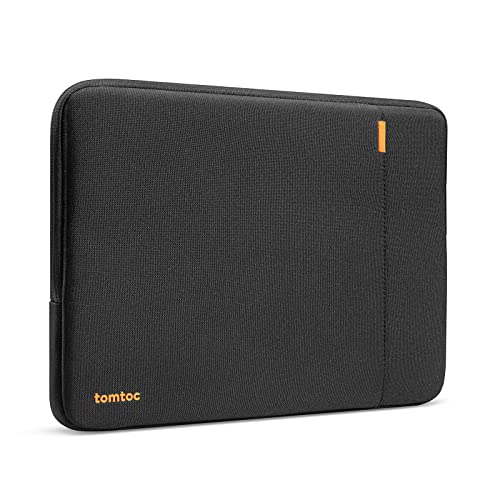
- Best for: 14-inch MacBook Pro owners who want corner protection in a slim sleeve.
- Internal dimensions: 12.31 x 8.71 x 0.61 inches
- Exterior dimensions: 13.27 x 1.26 x 9.72 inches
- Weight: 8 ounces
- Maximum device size: 14.2 inches

- Best for: 15–15.6-inch laptop owners who want a light vertical sleeve with a big front pocket.
- Model: MO-15-Polyester-Vertical-Sleeve-Black
- Internal dimensions: 15.55 x 0.79 x 11.42 inches
- External dimensions: 16.14 x 0.79 x 11.81 inches
- Weight: 8.5 ounces

- Best for: 15–15.6-inch laptop owners who want a soft, puffy sleeve with a pouch for accessories.
- External dimensions: 15.15 x 0.79 x 10.23 inches
- Weight: 11.3 ounces
- Puffy soft-touch polyester outer
- Polyester foam padding layer with fluffy fleece fabric lining
All 4 Picks at a Glance
| Product | Specs | Action |
|---|---|---|
| tomtoc 360° Protective Laptop Sleeve, 14-inch |
| Check price on Amazon |
| MOSISO Laptop Sleeve Vertical, 15–15.6 inch |
| Check price on Amazon |
| MOSISO Puffy Laptop Sleeve, 15–15.6 inch |
| Check price on Amazon |
 Inateck Laptop Sleeve LB01005, 13 inch |
| Check price on Amazon |
Key takeaways
- Find the best laptop sleeves for travel and work, with padded protective picks for 13, 14 and 15-inch laptops, plus specs and real Amazon picks.
A laptop sleeve is the layer between a good laptop and a bad day. It rides inside a backpack, a tote, or a carry-on, and it absorbs the bumps, the spills, and the corner knocks that would otherwise reach the machine itself. The right sleeve fits snugly, closes cleanly, and adds almost no bulk. The wrong one lets the laptop shift, forces a thick machine into a tight pocket, or leaves the corners exposed.
This guide compares five sleeves that cover the sizes most people actually carry: 13, 14, and 15 to 16 inches. There is a corner-armored pick for a 14-inch MacBook Pro, two MOSISO sleeves for larger machines, a slim splash-proof Inateck for 13-inch laptops, and a felt envelope sleeve for people who want the lightest possible cover. Every pick below carries its real Amazon code, so you can check the listing yourself before you buy.
Quick Picks
As an Amazon Associate we earn from qualifying purchases
| Product | Best for | Key spec |
|---|---|---|
| tomtoc 360° Protective Laptop Sleeve, 14-inch | 14-inch MacBook Pro owners who want corner protection | 14.2-inch max fit, CornerArmor corners |
| MOSISO Laptop Sleeve Vertical, 15–15.6 inch | 15–15.6-inch laptop owners who want a light vertical sleeve | 8.5 ounces, 11.81 x 11.02-inch front pocket |
| MOSISO Puffy Laptop Sleeve, 15–15.6 inch | 15–15.6-inch laptop owners who want a soft, puffy sleeve | Small pouch included, Best Sellers #5 in Laptop Sleeves |
| Inateck Laptop Sleeve LB01005, 13 inch | 13-inch MacBook and Surface Pro owners who want splash protection | Splash-proof polyester, flannel lining |
| Inateck Felt Sleeve MP1303, 13.3 inch | 13.3-inch MacBook owners who want the lightest felt cover | Felt outside, flannel inside, 35 x 25 cm |
How to Choose
Match the internal fit, not the label
A sleeve labeled for a 14-inch laptop can still be too tight for a thick 14-inch machine, because the number on the box is a screen size, not a body size. Compare the sleeve’s internal dimensions with your laptop’s length, width, and thickness before you order. The tomtoc in this guide, for example, fits a 14.2-inch machine at most, with an interior of 12.31 by 8.71 by 0.61 inches. A laptop thicker than that, or one wearing a hard shell, will not slide in. Measure once, and the sleeve will fit the way it should.
Padding that protects corners
Corners die first. A laptop that shifts inside a bag hits the same corner again and again, so the padding at the corners matters more than the padding in the middle. Look for reinforced corners, a raised rim, or a foam layer that wraps the edges. The tomtoc uses CornerArmor bumpers for exactly this reason, while the MOSISO sleeves rely on a foam layer plus a soft lining. Felt, as in the Inateck MP1303, guards against scratches but gives less against a hard knock. Match the padding to how rough your carry really is.
Material and weather
Polyester sleeves shrug off spills and wipe clean, which makes them the safer choice for commutes in rain or for a bag that rides next to a water bottle. Felt looks and feels softer, but it absorbs moisture and needs dry cleaning, so it suits a laptop that lives in a dry office bag. Recycled polyester, used by tomtoc, adds spill resistance without adding weight. Check the care notes on the listing before you buy: a sleeve you cannot clean becomes a sleeve you stop using.
Pockets, zippers, and daily carry
A sleeve is more than a padded pocket. A front pocket for a charger and cable means fewer loose items in your bag, and a smooth zipper matters every time you pull the laptop out in a meeting. YKK zippers, found on the tomtoc, are known for gliding without snagging. Vertical sleeves slide into a bag like a book, while horizontal sleeves open wider on a desk. Weight counts too: the lightest pick here is 8 ounces, the heaviest 11.3, and that difference shows up on a long walk.
The 5 Best Options
tomtoc 360° Protective Laptop Sleeve, 14-inch
- Best for: 14-inch MacBook Pro owners who want corner protection in a slim sleeve.
- Internal dimensions: 12.31 x 8.71 x 0.61 inches
- Exterior dimensions: 13.27 x 1.26 x 9.72 inches
- Weight: 8 ounces
- Maximum device size: 14.2 inches
14-inch MacBook Pro owners who want corner protection in a slim sleeve.
Sleeve only — no shoulder strap or handle, so it needs a bag for carrying on its own. The interior is cut tight, so a thick machine with a hub stacked inside may not fit.
The tomtoc 360 is the most protective sleeve in this group, and it earns that spot with padding where it matters most: the corners. CornerArmor bumpers wrap all four impact points, high-resilience edges run along the sides, and high-density soft padding lines the inside. The shell is spill-resistant recycled polyester, the zipper is YKK, and the soft interline lining will not scuff an aluminum lid. A front pocket measuring 10.04 by 8.07 inches holds a charger, a cable, a mouse, or a small drive. At 8 ounces it stays light, and the internal fit of 12.31 by 8.71 by 0.61 inches is cut close around a 14-inch MacBook Pro.
Watch out for: Sleeve only — no shoulder strap or handle, so it needs a bag for carrying on its own. The interior is cut tight, so a thick machine with a hub stacked inside may not fit.
MOSISO Laptop Sleeve Vertical, 15–15.6 inch
- Best for: 15–15.6-inch laptop owners who want a light vertical sleeve with a big front pocket.
- Model: MO-15-Polyester-Vertical-Sleeve-Black
- Internal dimensions: 15.55 x 0.79 x 11.42 inches
- External dimensions: 16.14 x 0.79 x 11.81 inches
- Weight: 8.5 ounces
15–15.6-inch laptop owners who want a light vertical sleeve with a big front pocket.
The 0.79-inch depth is slim — measure a thick 15.6-inch machine before ordering. The vertical pocket adds bulk on one side.
The MOSISO Vertical is the lightest way to carry a 15 or 15.6-inch laptop. It weighs 8.5 ounces, and the vertical design means the sleeve slides into a bag the way a book slides onto a shelf. A polyester foam padding layer and a soft fabric lining guard against bumps and scratches, while the top-opening zipper glides smoothly for quick access. The front vertical pocket is unusually large at 11.81 by 11.02 inches, so a charger, pens, and a notebook fit alongside the machine. Internal dimensions of 15.55 by 0.79 by 11.42 inches suit most 15.6-inch laptops, including the 16-inch MacBook Pro.
Watch out for: The 0.79-inch depth is slim — measure a thick 15.6-inch machine before ordering. The vertical pocket adds bulk on one side.
MOSISO Puffy Laptop Sleeve, 15–15.6 inch
- Best for: 15–15.6-inch laptop owners who want a soft, puffy sleeve with a pouch for accessories.
- External dimensions: 15.15 x 0.79 x 10.23 inches
- Weight: 11.3 ounces
- Puffy soft-touch polyester outer
- Polyester foam padding layer with fluffy fleece fabric lining
15–15.6-inch laptop owners who want a soft, puffy sleeve with a pouch for accessories.
Heavier than the other picks at 11.3 ounces, and the puffy shell takes more room inside a packed bag.
The MOSISO Puffy trades a flat profile for a soft, quilted feel. The puffy polyester outer has a gentle give that cushions the laptop, and a polyester foam layer plus a fluffy fleece lining sit between the shell and the machine. A small pouch in the same color comes with the sleeve for a mouse and earphones, which keeps accessories from rattling loose in a bag. At 11.3 ounces it is the heaviest pick here, but it is also the most forgiving to handle. The sleeve fits 15 to 15.6-inch laptops, including the 16-inch MacBook Pro, and it holds the number five spot among laptop sleeves on Amazon.
Watch out for: Heavier than the other picks at 11.3 ounces, and the puffy shell takes more room inside a packed bag.
Inateck Laptop Sleeve LB01005, 13 inch
- Best for: 13-inch MacBook and Surface Pro owners who want a splash-proof sleeve at a low weight.
- Model: LB01005-BK-US
- Dimensions: 12.8 x 8.86 x 1.18 inches
- Splash-proof polyester fabric exterior
- Super soft flannel lining
13-inch MacBook and Surface Pro owners who want a splash-proof sleeve at a low weight.
The listing crawl is from 2026 and shows no fresh stock signal in the excerpt — confirm the listing is live before buying. Sized for 13-inch machines; a 14-inch laptop will not fit.
The Inateck LB01005 is a slim, splash-proof sleeve for 13-inch machines. The exterior is splash-proof polyester, so a spilled drink or a rainy walk does less damage, and the super soft flannel lining keeps the lid free of scratches. At 12.8 by 8.86 by 1.18 inches it fits the 13-inch MacBook Pro from 2016 to 2020, the MacBook Air, and the 12.3-inch Surface Pro, plus most 11.6 to 12.3-inch Chromebooks and laptops. There is no bulky padding here, so the sleeve adds almost nothing to the machine it protects. It is the simplest pick in this guide, and for a thin 13-inch laptop it is often enough.
Watch out for: The listing crawl is from 2026 and shows no fresh stock signal in the excerpt — confirm the listing is live before buying. Sized for 13-inch machines; a 14-inch laptop will not fit.
Inateck Felt Sleeve MP1303, 13.3 inch
The Inateck MP1303 is the lightest and simplest sleeve in this guide. High-quality felt forms the outside, soft flannel lines the inside, and an elastic tape flap keeps the whole thing closed. A second compartment holds magazines or a tablet, two back pockets take a phone or a notepad, and a small felt bag for a mouse comes in the box. At 35 by 25 centimeters it fits a 13.3-inch MacBook Pro Retina and most 11-inch ultrabooks. Felt will not stop a hard drop the way foam will, so this pick suits careful carry inside another bag rather than rough handling on its own.
Specs
- Model: MP1303
- Felt outside with soft flannel inside
- Dimensions: 35 x 25 cm
- Fits 13.3-inch MacBook Pro Retina and most 11-inch ultrabooks
- Elastic tape flap closure with card slot
- Second compartment for magazines and tablets
- Two back pockets for phone, notepad, and small items
- Small felt bag for mouse included
- Dry clean only
Best for: 13.3-inch MacBook owners who want the lightest, simplest felt cover.
Watch out for: Felt is dry clean only and picks up dust; thin felt gives scratch protection, not heavy drop protection. The crawl is from the UK listing, so confirm US stock at publish time. It will not fit a laptop that already wears a protective case.
Which One Fits Your Situation
You commute with a 14-inch MacBook Pro
Take the tomtoc 360. Its CornerArmor bumpers guard the corners that hit first, the interior is cut close around a 14-inch MacBook Pro, and the front pocket holds the charger and cable. It has no strap or handle, so it rides inside a bag rather than on its own for daily travel.
You carry a 15 or 16-inch laptop
Choose between the two MOSISO sleeves. The Vertical is lighter and slides into a bag like a book, with a large front pocket. The Puffy is softer and comes with a small pouch for a mouse and earphones, which is handy on trips. Both fit 15 to 15.6-inch machines, including the 16-inch MacBook Pro.
You want the lightest sleeve for a 13-inch machine
Pick the Inateck LB01005 if you want splash protection and a zipper, or the Inateck MP1303 if you want the lightest possible cover. The LB01005 is splash-proof polyester with a flannel lining; the MP1303 is felt with a flap, and it weighs almost nothing. Both are slim enough to slip into any bag without adding bulk.
You travel with chargers and accessories
Look at the pockets. The tomtoc front pocket takes a charger, cable, mouse, or small drive. The MOSISO Vertical has the largest front pocket in this group. The MOSISO Puffy adds a matching pouch, and the MP1303 has a second compartment plus two back pockets for a phone and a notepad.
Common Mistakes
- Buying by screen size alone instead of measuring the laptop’s length, width, and thickness.
- Choosing a sleeve with no corner padding for a laptop that rides loose in a bag.
- Picking felt for a wet commute — felt absorbs moisture and needs dry cleaning.
- Ordering a 13-inch sleeve for a 14-inch machine, or for a laptop that already wears a hard shell.
- Forgetting the accessories: a sleeve with no pocket leaves the charger and mouse loose in the bag.
Frequently Asked Questions
Will a 14-inch sleeve fit a 15-inch laptop?
No. A sleeve is cut to a maximum device size, and the tomtoc in this guide tops out at 14.2 inches. A 15-inch machine needs a sleeve made for 15 to 15.6-inch laptops, like the two MOSISO picks. Measure the laptop first, then match the sleeve’s internal dimensions.
Do I still need a sleeve if my backpack is padded?
Yes, for most people. A backpack’s padding guards the outside of the bag, while a sleeve guards the laptop itself against the keys, cables, and chargers that share the same compartment. A sleeve also keeps the lid free of scratches when the laptop slides in and out.
Can I wash a felt laptop sleeve?
The Inateck MP1303 is dry clean only, so do not machine wash it. Felt absorbs water and can lose its shape. Polyester sleeves are easier: wipe the shell with a damp cloth and let it air dry. Always check the care notes on the listing before cleaning any sleeve.
What is the difference between a sleeve and a laptop bag?
A sleeve is a slim protective cover with no strap or handle, made to ride inside another bag. A laptop bag carries the machine on its own, with a strap, a handle, and room for more gear. The five picks in this guide are sleeves, so plan on carrying them inside a backpack, a tote, or a carry-on.
FAQ
Will a 14-inch sleeve fit a 15-inch laptop?
Do I still need a sleeve if my backpack is padded?
Can I wash a felt laptop sleeve?
What is the difference between a sleeve and a laptop bag?
More from Amazon
Programs that pair well with the guide above. Offers and eligibility are set by Amazon and may change.
Free shipping on eligible items, Prime Video and more. Eligible new members can start with a free trial.
Start a Prime free trialAudiobooks and podcasts to listen to on the go. Eligible new members can start with a free trial.
Try Audible freeAd-free music streaming. Eligible new subscribers can start with a free trial.
Try Music Unlimited freeA free business account with business pricing and bulk-buying tools for work, shop or home office.
Create a business accountAs an Amazon Associate we earn from qualifying purchases.




Write Your Review
No reviews yet. Be the first to share your experience!